6-Month Live Specialization
Grades 9–12 • Matric / Inter / O/A Level • College Beginners Enrollment Inquiries Open

Python Desktop Application Developer

From Python Beginner to Building Real GUI & Database Applications.

A practical 6-month live online specialization for school and college beginners. Learn Python, design Tkinter desktop interfaces, integrate SQLite relational databases, and package real management applications.

Duration6 Months
Learning Plan24 Weeks
Core Sessions72 Lessons
Group TuitionPKR 6,500/mo
Admissions & Syllabus Consultation: Enrollment inquiries are open. Admissions confirms your timetable, session format, and enrollment terms prior to payment. Speak with an advisor to review the 24-week roadmap.
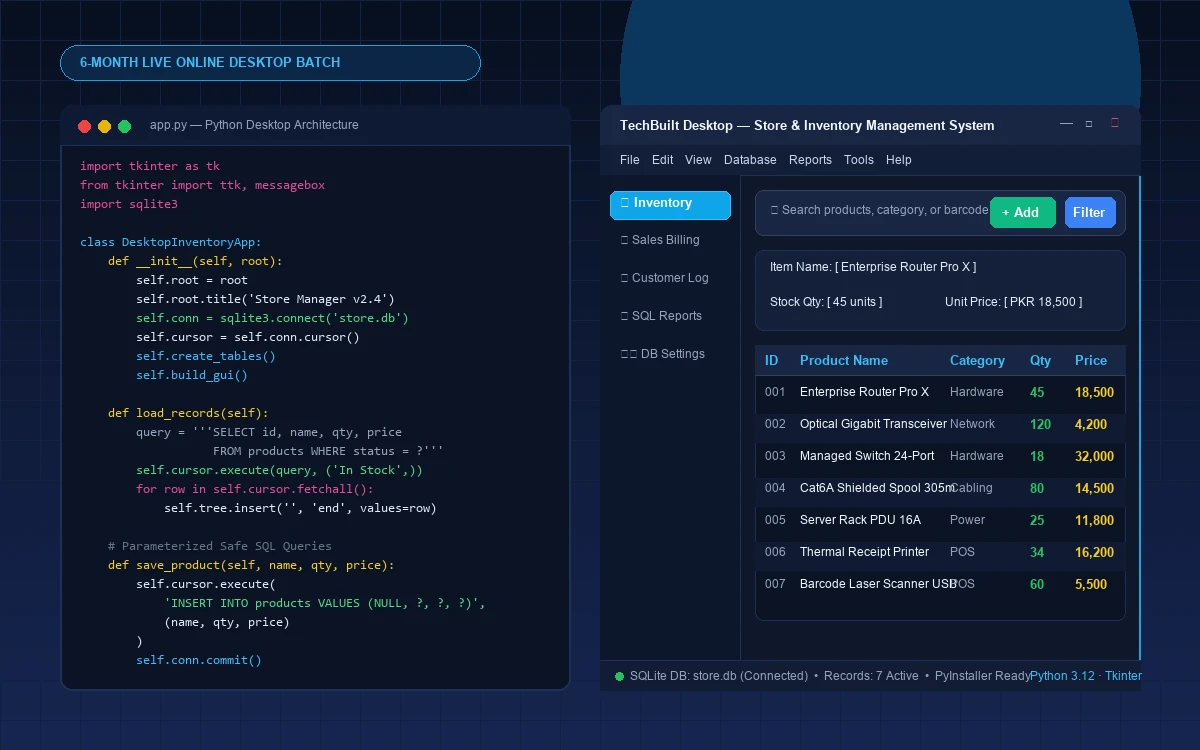
Student building a Python Tkinter and SQLite desktop application in an online live class
Live Online • Small Group or 1-on-1

From Python Beginner to Building Real GUI & Database Applications.

Monthly Group Offer
Rs 6,500/month
Verified Live Cohort
One-to-One:Rs 15,000/month
Schedule:3–4 Live Classes/Week
Session Length:60 Minutes Each
Next Cohort:Confirmed with admissions
72 sessions are planned across 24 weeks. Exact dates, holidays and timetable are confirmed by admissions.
Duration

6 months

Classes / Week

3–4 Live Classes/Week

Session Length

60 Minutes Each

Learning Format

Live Online • Small Group or 1-on-1

Target Audience

Matric, FSc, ICS, O/A Level, college beginners and adult starters

Tuition Structure

Rs 6,500 / month

KEY CURRICULUM HIGHLIGHTS

Why Learn Desktop Application Development with Python?

Python Desktop Application Developer is an intensive yet beginner-accessible 6-month live online specialization. Designed specifically for Matric, FSc, ICS, O/A Level, and college students, this program bridges pure programming logic and practical software creation. Over 24 weeks and 72 core live lessons, learners advance through Python fundamentals, graphical interface design with Tkinter, relational database management with SQLite, business logic implementation, and automated desktop application packaging with PyInstaller.

  • Comprehensive 24-week curriculum with 72 core live lessons (3–4 classes/week, 60 min each)
  • From Python fundamentals to visual Tkinter GUI widgets and multi-screen desktop interfaces
  • Relational database development with SQL, SQLite, and safe parameterized queries
  • Practical business modules: inventory calculations, store billing, receipts, and record filters
  • Standalone Windows desktop packaging with PyInstaller and professional GitHub documentation
  • Transparent tuition: Group PKR 6,500/month or Private PKR 15,000/month with zero artificial discounts
MILESTONE CAPSTONE

Database-Driven Desktop Management Software

Students architect, code, test with pytest, and package a standalone Windows executable (.exe) desktop application (Store Inventory, Restaurant POS, School Records, or Library System) with SQLite persistence.

Verified Outcome

Verified, standalone Windows desktop application with complete source code, tests, and student-led demonstration.

Looking for the complete 24-week academic specialization overview?Academic Roadmap
VERIFIED LIVE-BATCH CURRICULUM

Courses, Chapters & Portfolio Projects

The live batch is organized as complete courses. Each course has a locked chapter sequence, one practical project, and a final integrated capstone.

Approved 24-week Python desktop application development sequence for high school, college beginners, and adult starters. 72 core live lessons over 24 weeks with fourth lab/review sessions where scheduled. Group PKR 6,500/month, One-to-one PKR 15,000/month. Exact timetables confirmed by admissions.

Course 1

Python Programming Foundations

Weeks 1–6 · 18–24 classes

Learning objective

Establish rock-solid programming syntax, algorithmic problem solving, and procedural structure.

Core chapters

  1. 1Python installation, environment setup, syntax, variables & data types
  2. 2Operators, conditionals, nested decisions & logic structures
  3. 3Loops (for, while), practical problem solving & iterative algorithms
  4. 4Strings, lists, tuples, dictionaries, sets & collection methods
  5. 5Functions, scope, parameters, return values & program decomposition
  6. 6Error handling, file paths, text/CSV/JSON files & GUI-prep beginner OOP

Guided activities

Interactive number-guessing game • Multi-subject student grade & percentage calculator • Text-based menu navigation system

Course project

Console Student Records Manager & File-Based Expense Tracker

Course outcome

Write modular console programs with clean functions and robust user input validation.

Parent-visible outcome

Student can independently demonstrate, explain, and modify a structured Python script.

Level: Beginner • Guided logic

Milestone: Can explain how variables, loops, and functions work together to process user data.

Course 2

Python GUI Development with Tkinter

Weeks 7–12 · 18–24 classes

Learning objective

Transform Python command-line logic into visual, clickable desktop applications.

Core chapters

  1. 1Desktop GUIs vs console scripts, window architecture & main event loop
  2. 2Widgets: Labels, entries, buttons, text boxes, fonts & layout managers (pack, grid)
  3. 3Form design, event bindings, Tkinter variables & input validation
  4. 4Message boxes, notifications, comboboxes & ttk styled widgets
  5. 5Treeview tabular displays, scrollbars, menus & multi-screen navigation
  6. 6Accessible UI principles, reusable widget classes & practical UX structure

Guided activities

Visual GUI Calculator with custom button grid • Student Registration Form with radio buttons and comboboxes • Interactive Multiple-Choice Quiz with live score calculation

Course project

Interactive GUI Calculator & Validated Student Registration Form

Course outcome

Design multi-widget visual desktop forms with interactive validation and clear feedback.

Parent-visible outcome

A visual desktop application window with clickable buttons, input fields, and alerts.

Level: Intermediate • Visual UX

Milestone: Can structure a responsive grid layout that adapts cleanly without overlapping widgets.

Course 3

SQL & SQLite Database Development

Weeks 13–16 · 12–16 classes

Learning objective

Master full database CRUD operations from desktop user interfaces with safe SQL.

Core chapters

  1. 1Relational database concepts: Tables, rows, columns, primary & foreign keys
  2. 2SQLite schema design, data types, constraints & relational integrity
  3. 3SQL core: INSERT, SELECT, WHERE, ORDER BY, UPDATE, DELETE & basic JOINs
  4. 4Python sqlite3 module, database connections & cursor management
  5. 5Safe parameterized queries, error handling, commits & rollbacks
  6. 6Connecting Tkinter forms and Treeview tables to persistent SQLite records

Guided activities

Writing SQLite table creation and migration scripts • Parameterized search bar filtering records in real time • Row selection binding that loads table data back into editable input fields

Course project

Full-Featured SQLite-Connected Student Management System

Course outcome

Connect Tkinter desktop interfaces to persistent relational SQLite databases.

Parent-visible outcome

A complete desktop software where records are added, searched, edited, and permanently saved in a database.

Level: Intermediate • Database engineering

Milestone: Can execute safe parameterized SQL queries and synchronize database changes with the GUI table.

Course 4

Business Desktop Application Engineering

Weeks 17–20 · 12–16 classes

Learning objective

Synthesize GUI, SQL, and business rules into modular, scalable application code.

Core chapters

  1. 1Business requirements analysis, user stories & functional specifications
  2. 2Multi-module desktop architecture: Separating UI, database & business logic
  3. 3Product and inventory management, stock level tracking & category filters
  4. 4Billing workflows: Cart calculation, tax/discounts & receipt generation
  5. 5Search, filtering, data validation & robust business rule enforcement
  6. 6Local application security, data integrity checks & CSV/data export reporting

Guided activities

Designing an inventory tracking schema with supplier foreign keys • Building a dynamic cart total calculator with automatic change calculation • Generating formatted sales summary reports exported to CSV

Course project

Store Billing & Inventory Management Module

Course outcome

Implement real-world commercial software workflows with multi-screen navigation.

Parent-visible outcome

A practical desktop management system that tracks stock, calculates sales bills, and exports reports.

Level: Intermediate • Business logic

Milestone: Can separate database queries, business math, and UI display into distinct clean modules.

Course 5

Final Capstone, Testing & Desktop Deployment

Weeks 21–24 · 12–16 classes

Learning objective

Produce a verified, standalone desktop software portfolio capstone with clean source code.

Core chapters

  1. 1Capstone specification, database modeling & modular project scaffolding
  2. 2Independent feature development, error handling & edge-case testing
  3. 3Writing test plans, manual test checklists & selected pytest unit tests
  4. 4Git version control, clean commits, GitHub repositories & README documentation
  5. 5PyInstaller introduction & compiling standalone Windows .exe desktop packages
  6. 6Installation verification on fresh environments & final project presentation

Guided activities

Writing pytest assertions for business calculation functions • Running PyInstaller build commands with custom icon and SQLite packaging • Demonstrating the completed .exe application running live without Python installed

Course project

Packaged Desktop Application Capstone (Inventory, School, Restaurant, or Library System)

Course outcome

Independently build, test, document, and package a complete desktop software application.

Parent-visible outcome

A standalone, installable Windows desktop software application with complete documentation and live student demonstration.

Level: Capstone • Independent build

Milestone: Student can explain their software architecture, run automated tests, and distribute a working Windows executable.

Final Integrated Capstone

Independent development, manual testing, pytest verification, and PyInstaller Windows packaging of one complete desktop management software application (Store Inventory System, Restaurant POS, School Records Manager, or Library System) with SQLite persistence.

TARGET AUDIENCE & ELIGIBILITY

Who Is This 6-Month Specialization Designed For?

Engineered to welcome complete beginners without prior programming knowledge, while delivering the depth required for meaningful software projects.

Secondary School

Matric Students (Grades 9–10)

Build genuine computer science skills early. Move beyond rote textbook definitions into writing real Python scripts, constructing desktop windows, and understanding how practical software works.

Curriculum Focus

Python programming basics, logic building & first graphical interface

Higher Secondary

FSc & ICS Intermediate Students

Complement board syllabus theory with practical software engineering. Master relational databases, SQL queries, and desktop application architecture to enter university leagues ahead of peers.

Curriculum Focus

Object-oriented GUI design, SQLite database modeling & CRUD algorithms

Cambridge Equivalent

O Level & A Level Students

Strengthen algorithmic problem solving, structured programming, and project evidence. Gain hands-on experience designing modular software and writing verified test cases.

Curriculum Focus

Modular architecture, clean code standards & independent capstone

Undergraduate Starters

College & University Beginners

Ideal for semester-one engineering or CS students who need practical desktop GUI experience before advancing to complex distributed systems or web frameworks.

Curriculum Focus

Desktop event loops, multi-table SQL queries & PyInstaller packaging

Career Transition

Adult Starters & Transitioners

Learn Python by building tangible business management tools you can run on your own machine without dealing with complex cloud hosting, CSS frameworks, or servers.

Curriculum Focus

Inventory management, store billing tools & local database applications

Parent Peace of Mind

Parents Seeking Project-Based Education

Provide your child with a transparent, structured 6-month pathway. Every month culminates in a visible software milestone you can test and run on your family computer.

Curriculum Focus

Monthly milestone demonstrations & transparent instructor guidance

SOFTWARE ARCHITECTURE CLARITY

What Is Desktop Application Development?

Desktop software runs directly on an operating system (Windows, macOS, or Linux) with interactive visual windows, buttons, menus, and local databases. Unlike websites, desktop applications work completely offline, do not require web servers or monthly cloud hosting costs, and provide full control over local hardware and files.

Console Scripts

Examples: CLI calculator, text menu, script runner

Interface: Black terminal screen with text prompt

Data: Variables in memory or plain text files

Program Role

Mastered in Course 1 as the algorithmic foundation.

Desktop GUI ApplicationsTaught Here

Examples: Accounting software, POS terminals, inventory managers

Interface: Native desktop windows, buttons, menus & tables (Tkinter)

Data: Persistent, fast local relational database (SQLite)

Program Role

The core focus of this 6-month specialization.

Database-Powered Desktop SoftwareTaught Here

Examples: School ERP desktop client, clinic records, warehouse software

Interface: Multi-screen Tkinter forms with Treeview tables

Data: Relational tables with primary keys, foreign keys & safe SQL

Program Role

Engineered in Courses 3, 4, and 5 with full CRUD and exports.

Web / Mobile Applications

Examples: SaaS portals, e-commerce websites, mobile apps

Interface: Browser HTML/CSS or iOS/Android touch screens

Data: Remote web servers, REST APIs, cloud databases

Program Role

Covered in our distinct Full-Stack & Mobile career tracks.

REAL SOFTWARE SHOWCASE

What Desktop Software Will Students Build?

We believe in genuine software development, not trivial syntax quizzes. Students build practical, multi-module desktop applications with real SQLite database persistence.

4 Guided Modules + 1 Capstone
Commercial Business Application
Featured Capstone

Store Inventory Management System

A complete retail stock management desktop application. Allows store managers to add products, categorize items, monitor low-stock thresholds, search records, and export CSV stock reports.

Functional Capabilities
Product catalog with ID, name, category, supplier, stock level, and price
Low-stock alert indicator and real-time inventory quantity calculation
SQLite database persistence with safe parameterized INSERT/UPDATE/DELETE queries
Multi-column Treeview table with column sorting and live text search filtering
CSV export functionality for business reporting and offline spreadsheets
Python 3.12Tkinter ttkSQLite3CSV ExportsPyInstaller
Educational Institutional Software
Milestone Project

Student & College Records Management System

An administrative records application for schools and tuition centers. Features student registration, grade tracking, attendance summaries, and student profile search.

Functional Capabilities
Validated student registration form with input error checking and comboboxes
Grade calculator and percentage summary with automated status indicator
Relational database schema linking student profiles with academic grades
Confirmation dialogs on record deletion to prevent accidental data loss
Clean, accessible desktop window layout adhering to UX consistency standards
Python 3.12Tkinter ttkSQLite3Data ValidationDialogs
Point of Sale (POS) Software
Business Module

Restaurant Order & Table Billing POS

A touch-and-click billing terminal for food businesses. Cashiers select menu items, choose table numbers, calculate taxes/subtotals dynamically, and generate formatted receipts.

Functional Capabilities
Interactive menu category buttons and live cart item summary
Dynamic subtotal, tax calculation, change calculator, and receipt formatting
Daily sales order recording in a persistent SQLite transaction database
Input validation preventing negative quantities or invalid payment amounts
Python 3.12TkinterSQLite3Business MathReceipts
Retail Accounting Module
Commerce Module

Store Billing & Customer Invoice Manager

A practical desktop invoice generation application designed for local shops. Calculates discounts, item totals, customer details, and writes printable text invoices.

Functional Capabilities
Customer details entry with phone and invoice number auto-generation
Itemized bill calculation with live quantity and unit price updates
Search past invoices by customer phone number or invoice ID
Printable text receipt generation saved directly to local storage
Python 3.12TkinterFile HandlingSQLite3Invoicing
ACADEMIC ROADMAP

Six Progressive Monthly Milestones

Every month develops a defined capability and finishes with an independently verifiable software project.

Month 1Weeks 1–4 · 12–16 classes

Python Foundations & Programming Logic

Syntax, variables, numeric/string data types, operators, conditionals, loops, functions, lists, and dictionaries.

Month Milestone

Student Result Calculator & Console Records Manager

Month 2Weeks 5–8 · 12–16 classes

Files, Clean Code & GUI-Prep OOP

Text files, CSV parsing, JSON configs, exception handling (try-except), classes, objects, methods, self, and modules.

Month Milestone

File-Based Expense Tracker with Category Summaries

Month 3Weeks 9–12 · 12–16 classes

Tkinter Graphical User Interface Development

Window architecture, pack/grid geometry, labels, entries, buttons, ttk widgets, event callbacks, dialogs, and forms.

Month Milestone

Interactive GUI Calculator & Validated Registration Form

Month 4Weeks 13–16 · 12–16 classes

Relational SQL & SQLite Database Engineering

Database schemas, tables, primary/foreign keys, SQL CRUD, sqlite3 Python module, safe parameterized queries, and Treeview tables.

Month Milestone

Full-Featured SQLite-Connected Student Management System

Month 5Weeks 17–20 · 12–16 classes

Business Desktop Application Engineering

Multi-module architecture, separation of concerns (GUI vs DB vs business math), inventory calculations, sales billing & CSV reporting.

Month Milestone

Guided Store Billing & Inventory Management Module

Month 6Weeks 21–24 · 12–16 classes

Capstone, Testing & Windows Deployment

Independent capstone development, manual test plans, selected pytest tests, Git/GitHub README, PyInstaller compilation to Windows .exe.

Month Milestone

Packaged Windows Desktop Management Software Capstone

PEDAGOGICAL METHODOLOGY

The Practical Learning System

How our instructors guide students from initial concepts to independent implementation.

01

Understand

Live instructor-led walkthrough of programming syntax, GUI widget geometry, and SQL principles with real-time Q&A.

02

Practice

Guided coding exercises during each 60-minute session so students never code alone or get stuck on setup.

03

Build

Apply concepts to real software components: forms, database tables, search filters, and business calculation logic.

04

Review

One-on-one code reviews where students explain their own code and receive direct instructor feedback.

05

Improve

Debug errors, refine layout styling, write automated tests, and compile standalone executables for real deployment.

Individual Assessment Policy: Students are not graded on multiple-choice memorization. Assessment is based on the student's ability to explain their code structure, modify functions during reviews, and debug issues live in front of the instructor.
TRANSPARENT TUITION

Honest, Transparent Monthly Tuition

Choose collaborative live group classes or dedicated private one-to-one tuition. No artificial discounts, no fake crossed-out prices.

Interactive Cohort
Interactive Cohort

Live Group Specialization

Learn with motivated peers in an interactive, small-group live online environment.

PKR 6,500/ month

Monthly tuition rate. Transparent enrollment terms confirmed by admissions.

  • 3–4 live online classes per week (60 minutes each)
  • Interactive small-group cohort for active participation and questions
  • Guided coding practice, milestone reviews & instructor feedback
  • 72 core live lessons planned over 24 progressive weeks
  • Timetable confirmed directly with admissions upon inquiry
Individual Mentoring
Dedicated 1-on-1

Private One-to-One

Personalized pacing and dedicated instructor attention tailored to your exact learning schedule.

PKR 15,000/ month

Monthly tuition rate. Customized schedule and pacing confirmed by admissions.

  • 100% dedicated 1-on-1 live instruction and personalized attention
  • Customizable weekly class times to match student schedule
  • Flexible pacing: accelerate concepts or deep-dive into complex areas
  • Direct code reviews and detailed individual progress tracking
  • Exact timetable and session frequency confirmed with admissions
HARDWARE & SETUP

Computer & System Requirements

Because desktop software development involves compiling Python scripts, managing local SQLite databases, and launching native GUI windows, a proper computer is required.

Computer: Any standard desktop PC or laptop running Windows 10/11, macOS, or Linux.
Memory (RAM): Minimum 4 GB RAM (8 GB recommended for comfortable multitasking).
Software: Standard Python 3.12+ and Visual Studio Code (installed during Week 1).
Connectivity: Reliable home internet connection for live video classes and screen sharing.
Important Hardware Notice

Smartphones, tablets (iPads/Android), and TV boxes are not suitable for this specialization. Students cannot construct native desktop window loops, install Tkinter development environments, or compile Windows executables on a mobile device alone.

If you need guidance verifying your laptop specifications before applying, our admissions team will gladly assist you.

PARENT TRUST & CURRICULUM CLARITY

A Transparent Guide for Parents & Guardians

We believe parents deserve total transparency about what their children learn, how much time is required, and how progress is communicated.

Age & Academic Fit

Best suited for students in Grades 9–12 (Matric, FSc, ICS, O/A Level) and early college. The curriculum moves at a deliberate, guided pace that accommodates ongoing school exams.

School Workload Balance

Sessions are 60 minutes, 3–4 times per week, scheduled outside regular school hours. Expected independent practice is 2–3 hours weekly, designed not to overwhelm school studies.

Monthly Project Milestones

Rather than abstract quizzes, parents can see, test, and interact with the software their child builds every month—from a calculator to a complete database inventory system.

Safe & Moderated Classes

All live sessions are instructor-led in small, moderated groups. No unsupervised public chat rooms or social media integrations are used.

Guardian Assistance

Guardians are welcome during the initial setup and orientation. Ongoing classes are structured so students develop coding independence and problem-solving confidence.

Transparent Admissions

No hidden registration fees, surprise material costs, or forced long-term contracts. Tuition is billed transparently every month at PKR 6,500 (group) or PKR 15,000 (private).

NEXT COHORT ADMISSIONS OPEN

Start Building Real Desktop Applications with Python.

Join our 24-week live online specialization. Learn Python programming, Tkinter GUI design, and SQLite databases through guided projects and direct instructor reviews.

3–4 Live Classes / Week 60-Minute Sessions Beginner Friendly Verified SQLite Projects
IDEAL CANDIDATES

Who this Cohort is For

  • Matric and O-Level students (Grades 9–10) looking for practical, project-based programming foundations
  • FSc, ICS, and A-Level students preparing for computer science degrees with real desktop software skills
  • College and university beginners wanting tangible GUI and database development experience
  • Parents seeking structured, transparent technical education with visible monthly project milestones
  • Adult beginners and career transitioners interested in building practical management desktop software
STARTING REQUIREMENTS

Prerequisites & Preparation

  • No prior programming knowledge required — complete beginners are warmly welcomed
  • A desktop computer or laptop running Windows, macOS, or Linux (smartphones/tablets are not suitable for coding desktop software)
  • Stable internet connection for 60-minute live interactive sessions and screen sharing
  • Basic computer literacy (typing, creating folders, opening terminal/command prompt)
TRANSPARENT LEARNING EXPERIENCE

What Live Cohort Learning Means

We focus on genuine mentorship, scheduled accountability, and real programming practice. Here is what to expect in every session.

Live Instructor Teaching

Classes are conducted live online with real-time screen sharing and step-by-step code demonstration by the assigned programming instructor — not pre-recorded videos.

Guided Practical Coding

Students write code alongside the mentor during the session. Immediate hands-on exercises ensure concepts are practiced and retained right away.

Interactive Live Q&A

Ask questions during class, work through syntax and runtime errors, and receive feedback on guided practice and submitted work.

Structured Milestones

Progress through 6 distinct roadmap phases with concrete milestone outcomes and a comprehensive capstone project showcasing your actual code.

FEE TRANSPARENCY

Choose Group or One-to-One Learning

Both formats follow the same six-month learning journey. Group learners follow a shared timetable; private learners receive individually agreed scheduling and pacing. Contact admissions to review the syllabus, timetable and enrollment terms before payment.

Syllabus consultation and timetable confirmation with admissions prior to enrollment
Paid monthly at the current group cohort rate
Exact schedule, time zone and start date confirmed by admissions
Current Group Offer
Rs 6,500/month

Group tuition is PKR 6,500/month. Dedicated private one-to-one is PKR 15,000/month.

Ask questions on WhatsApp with Admissions
One-to-One Learning
Rs 15,000/month

Individual pacing and timetable, subject to instructor availability.

FREQUENTLY ASKED QUESTIONS

Questions About Python Desktop App Developer

Clear, honest answers regarding curriculum, scheduling, fees, and the Free Demo trial session.

Who is the Python Desktop Application Developer specialization designed for?
This program is engineered for Matric students (Grades 9–10), FSc/ICS intermediate students, O Level and A Level learners, college beginners, and adult starters. It requires no prior programming background and guides students from Python foundations to building real GUI and database software.
What is the difference between desktop application development and web/mobile development?
Desktop applications run locally on a personal computer (Windows, macOS, or Linux) with native visual windows, dialogs, and persistent local databases (SQLite). Unlike websites, they work offline, access local files directly, and do not require web servers, hosting plans, or browser runtimes. They are standard for business management systems, billing terminals, inventory controllers, and institutional record software.
Does the course require prior programming or computer science experience?
No. Complete beginners are warmly welcomed. The first six weeks cover core Python programming step by step: syntax, variables, data types, loops, decision logic, functions, file handling, and error handling. Object-oriented concepts are introduced specifically to prepare students for GUI widgets.
What is Tkinter and why is it taught for desktop GUI development?
Tkinter is Python's standard, built-in graphical user interface toolkit. Because it comes pre-installed with Python, students learn core event-driven GUI concepts—windows, event loops, frames, buttons, entry inputs, and ttk themed widgets—without complicated third-party installations. It provides the ideal foundation for understanding desktop software architecture.
Why do desktop applications require a database like SQLite?
Real software requires persistent data that remains saved after the program closes. SQLite is a lightweight, zero-configuration relational database engine embedded directly into Python. Students learn to design normalized schemas, write safe parameterized SQL queries (preventing injection), and connect visual tables (ttk.Treeview) to persistent records.
What real software projects will students build during the 6 months?
Students build five progressive milestone projects: (1) Console Student Records & File Expense Tracker; (2) Interactive GUI Calculator & Student Registration Form; (3) Full-featured SQLite Student Management System; (4) Guided Store Billing & Inventory Module; and (5) an independent, packaged Windows desktop application capstone with automated pytest tests.
What is the tuition fee and billing structure?
Tuition is PKR 6,500/month for interactive live group classes or PKR 15,000/month for dedicated private one-to-one mentoring. Both are monthly tuition rates with no artificial discounts or false crossed-out prices. Payment details and enrollment terms are confirmed upon admissions consultation.
What is the class frequency, duration, and weekly schedule?
The teaching roadmap provides 3–4 live online classes per week, with each session lasting 60 minutes. The curriculum plans 72 core live lessons over 24 weeks, plus fourth lab/review sessions where scheduled. Specific cohort batch days and timings are confirmed directly by admissions to suit learner availability.
Is a free demo class available for this new specialization?
No free demo class has been approved for this specialization. Instead, applicants are encouraged to speak with admissions, request the complete 24-week syllabus, and discuss cohort timetable options prior to enrollment.
What computer hardware or operating system is required?
A desktop PC or laptop running Windows 10/11, macOS, or Linux, with at least 4 GB RAM and stable internet for live 60-minute video classes. Python 3.12+ and VS Code will be set up during the first week. Smartphones or tablets alone are not suitable for coding desktop GUI applications.
How does parent progress communication work?
Parents receive regular communication regarding monthly project milestones. Rather than memorizing abstract test questions, students demonstrate their understanding by explaining, modifying, and debugging their own desktop software projects live.
Is this live specialization available to international students?
Yes. We welcome students from Pakistan, the UAE, Saudi Arabia, the UK, Canada, the US, and other countries. Timetable arrangements are coordinated by admissions to align with convenient after-school or weekend hours in your time zone.
OTHER ACTIVE COHORTS

Explore Other Live Programs

Scheduled group classes currently accepting students.

Young learner building a beginner Python Turtle game during a live online coding class
6-Month Young Developer Specialization
Free Demo

From Computer Basics to Python Games & Real Applications

A parent-friendly, live online specialization that takes absolute beginners from basic computer confidence to Python logic, Turtle games, practical data work and a guided desktop application showcase.

Audience: Absolute beginners ages 10–15 (Grades 5–8)
Duration: 6 months
Schedule: 3 planned live sessions/week (60 minutes per session)
Monthly Fee:
Rs 10,000/monthRs 5,000/month

One parent-attended live demo session is free before enrollment

  • Designed for absolute beginners ages 10–15 in Grades 5–8
  • 24-week plan with 3 planned live sessions per week and 60-minute lessons (72 planned sessions total)
  • Six monthly projects: Digital Passport, Quiz, Turtle Scene, Turtle Game, Quiz Studio and guided GUI App
University learner working through structured 100 days Core Python programming in a professional workspace
Complete Python Series
Free Demo
3–4 classes/week

100 Days Complete Python

3 Learning Levels • 1 Complete Python Series (37 Live Lectures)

A structured 100-day intensive program delivering 37 comprehensive live lectures across 6 progressive phases — taking you from absolute fundamentals to advanced Python engineering.

Audience: Beginners, university students & career transitioners
Duration: 100 days
Schedule: 3–4 classes/week (1–1.5 hours per session)
Monthly Fee:
Rs 8,000/monthRs 5,000/month

Free trial session available before enrollment

  • 3 Learning Levels • 1 Complete Python Series (single unified program)
  • 37 structured live lectures with live instructor coding & screen sharing
  • 6 progressive phases covering syntax, OOP, files, and language internals
Professional developer writing Python automation and backend code on a modern dual-monitor workstation
Accelerated 45-Day Cohort
Admissions Guidance
Weekday (Mon–Thu, 8:00–9:00 PM PKT) or Weekend (Sat–Sun, 2:00–3:30 PM PKT)

Python FastTrack 45 — Live Online Python Course for Professionals

Accelerated Core Python for Working Professionals, Graduates & Researchers

An intensive 45-day live online program engineered for professionals, graduates, and researchers. Master practical Core Python syntax, data structures, modular file systems, and OOP through live instructor-led classes with evening, weekend, and one-to-one options.

Audience: Graduates, working professionals, career switchers & researchers
Duration: 45 days
Schedule: Weekday (Mon–Thu, 8:00–9:00 PM PKT) or Weekend (Sat–Sun, 2:00–3:30 PM PKT) (1 hour (Weekday) or 1.5 hours (Weekend))
Tuition Fee:
Rs 15,000 one-time

Admissions consultation and syllabus review available before enrollment

  • Accelerated 45-day intensive curriculum engineered for working professionals and researchers
  • Choice of Weekday evening (Mon–Thu 8–9 PM PKT) or Weekend afternoon (Sat–Sun 2–3:30 PM PKT) cohorts
  • Private one-to-one tuition available with customized scheduling and dedicated instructor attention
Scientific research and data analytics workstation with Python data analysis charts and Jupyter notebook
Data Analyst Cohort
Free Demo

Python • MySQL • Statistics • Power BI • 6 Portfolio Projects

A structured 6-month, 24-week, 96-class live program covering Python data work, MySQL, statistics, Power BI, and six portfolio checkpoints.

Audience: Students, graduates, professionals & career transitioners
Duration: 6 months
Schedule: 4 classes/week (1 hour per session)
Monthly Fee:
Rs 20,000/monthRs 10,000/month

Free trial session available before enrollment

  • 6 months • 24 weeks • 96 live classes
  • Python, NumPy, Pandas, cleaning, validation, EDA & visualization
  • MySQL business SQL: JOINs, subqueries, CTEs & window functions

Ready to start your learning journey?

Apply today and our admissions team will review your application and guide you through the next steps.

Monthly Fee
Rs 6,500/month